Managing a library's vast collection of books, tracking member information, and handling borrowing and returns can be a daunting task. Manual systems are prone to errors, slow, and inefficient. To solve this, we present an Advanced Library Management System (LMS) Project developed in PHP and MySQL, complete with a powerful barcode integration feature.
This project is a perfect learning tool for students pursuing degrees in computer science and information technology. It serves as an excellent final-year project, demonstrating key skills in web development, database management, and system design. You can download the complete source code for free and get started right away.
Core Features of the System
This LMS is packed with features designed to automate and simplify all aspects of library operations. The system is divided into modules, primarily managed through a comprehensive Admin/Librarian panel.
1. Professional Admin Dashboard
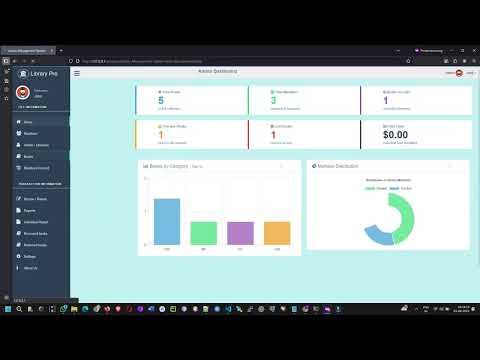
The first thing you see after logging in is a powerful, data-rich dashboard. It provides an at-a-glance overview of the library's status with:
Statistic Cards: Colorful cards displaying Total Books, Total Members, Books on Loan, Overdue Books, and more.
Visual Charts: Interactive charts showing the distribution of books by category and the breakdown of member types (Students vs. Teachers).
2. Complete Book Management
Add New Books: Easily add new books with details like Title, ISBN, Publisher, Copyright Year, and multiple authors.
Automatic Barcode Generation: When you add a new book or multiple copies, the system automatically generates a unique barcode for each copy.
Print Barcodes: Print individual or bulk barcode labels directly from the system to stick onto physical books.
Manage Catalogue: View, edit, and delete book records. The book list includes pagination, live search, and column sorting for easy navigation.
Track Book Status: Mark books as "New," "Lost," or "Damaged."
3. Efficient Member Management
Add Members: Register new members (Students or Teachers) with their essential details like Roll Number, Name, Branch, and Contact Info.
View & Edit Members: Manage the complete list of registered members, with options to view their profiles or update their information.
Track Member History: View a member's complete borrowing and return history.
4. Seamless Transaction Module (Borrow & Return)
Barcode-Based Transactions: Use the book's barcode to instantly look up and process borrowing or return requests, minimizing errors and speeding up the process.
Automated Due Dates: The system automatically calculates the due date based on the rules you set in the settings panel.
Penalty Calculation: Fines for overdue books are calculated automatically upon return.
5. Insightful Reporting
Generate Reports: Create detailed reports on borrowed books, returned books, and overdue items within a specific date range.
Individual Reports: Generate a complete report for a single member, showing all their current and past transactions.
Print-Friendly: All reports are designed to be easily printable for record-keeping.
Technology Stack
Front-End: HTML, CSS, JavaScript, Bootstrap
Back-End: PHP (Version 8.2)
Database: MySQL
Barcode Generation: picqer/php-barcode-generator (A modern, reliable PHP library)
Charts: Chart.js
Getting Started: Full Installation Guide
Follow these steps to get the project running on your local machine.
Prerequisites:
A local server environment like XAMPP or WAMP.
A code editor like VS Code.
Composer for managing PHP dependencies.
Step-by-Step Installation:
Download the Source Code
(Here you would add your download button/link)
<br>
<a href="#" class="button-download">Download Project Source Code (.zip)</a>Extract and Set Up the Project
Extract the downloaded .zip file.
Copy the project folder (Library-Management-System-with-Barcode) into your server's main directory (e.g., C:\xampp\htdocs\ or C:\wamp64\www\).
Install Dependencies
Open a terminal or command prompt inside the project folder.
Run the command: composer install
This will install the required barcode library into the vendor folder.
Database Setup
Open your XAMPP/WAMP control panel and start the Apache and MySQL services.
Open your browser and go to http://localhost/phpmyadmin/.
Create a new database and name it project_library (or any name you prefer).
Select the new database, go to the Import tab, and choose the .sql file included in the project folder to import the tables and dummy data.
Configure Database Connection
Open the file include/dbcon.php in your code editor.
Update the database connection details ($host, $user, $password, $dbname) to match your local server setup.
codePHP
$con = mysqli_connect('localhost', 'root', '', 'project_library');Run the Project
Open your browser and navigate to: http://localhost/Library-Management-System-with-Barcode/
Admin Login:
Username: admin
Password: admin123
Conclusion
This Library Management System project is a comprehensive and practical application that covers all the essential aspects of modern web development. The integration of barcode technology makes it a standout project for any student portfolio.
Download the source code today and start exploring! If you have any questions or run into issues during installation, feel free to leave a comment below.
Download Link
Demo Video