Managing school staff is one of the most underserved problems in education technology. Most school ERP systems handle admissions and fees reasonably well — but when it comes to HR, they fall flat. Attendance is tracked in one place, payroll in another, performance reviews happen on paper or in spreadsheets, and nobody has any record of who was promoted, when, or why.
ProjectWorlds Multi School ERP SaaS V2.0 just changed that.
The new HR module is a complete, end-to-end staff management system built for schools of every size. Whether you run a single campus or a multi-branch institution, every piece of HR is now handled in one place — from the day a staff member joins to the day they leave, and everything in between.
Here is everything you get.
A Real HR Dashboard — Not Just a Menu
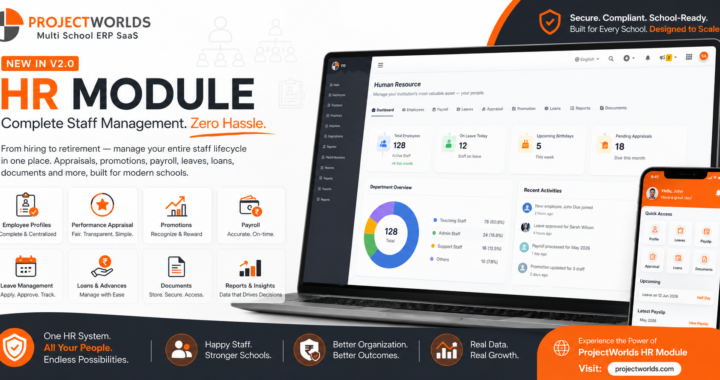
The moment you open the HR module, you land on a purpose-built dashboard that shows you exactly where things stand across your entire staff.
At a glance you can see your total active headcount, how many leave requests are pending approval, how many staff are on leave today, and your total outstanding loan balance. A department-wise breakdown shows you how your workforce is distributed across teams. Upcoming birthdays and work anniversaries for the next 30 days mean you never miss a moment to recognise your people.
The dashboard also flags operational items that need attention — unpaid payslips, attendance gaps, and quick links to the most common actions. It is the kind of overview that used to require a separate report. Now it is the first thing you see when you open HR.
Complete Staff Records — Every Detail, One Place
For years, school ERP systems have collected only the basics: name, phone number, designation. The important details — emergency contacts, statutory IDs, employment type, confirmation status, reporting manager — lived in files, spreadsheets, or nowhere at all.
The new Complete Employee Record feature changes this. Every staff member now has a rich, structured profile covering:
- Employment details — employment type (full-time, part-time, contract, probation), confirmation date, current status, and exit information when relevant
- Statutory information — PAN, Aadhaar, PF number, ESI number, UAN, and tax regime, all stored securely per school
- Emergency contact — name and phone number, available when it matters most
- Reporting manager — who each staff member reports to, building the foundation for a proper organisational structure
- Bank details — for direct payroll processing
- Blood group — for emergencies
- A complete audit trail — every change to every field is recorded with who made it and when, visible to administrators at any time
Nothing falls through the cracks. Nothing lives in a drawer.
Employment History — Because Promotions Should Be Remembered
Here is a question most school HR systems cannot answer: What was this teacher's designation three years ago, and when were they promoted?
With the new Employment History feature, every change in a staff member's career at your school is recorded permanently and displayed on their profile as a clean timeline. Promotions, transfers, departmental moves, salary revisions, deputation, and confirmation — every event is logged with the reason, the authorising document reference, and who approved it.
When you promote a staff member, their previous designation and salary are automatically preserved in the history. Their live profile updates immediately. You never lose the before. You always have the after.
The Promote / Change Role action is built right into the staff profile — no navigating to a separate module, no manual spreadsheet updates. One action, fully recorded, permanent.
This also means you can finally generate a proper promotion history report across your school — by department, by date range, by event type. That is the kind of institutional memory that makes HR decisions defensible and consistent.
Performance Appraisals — Structured, Consistent, and On Record
Paper-based performance reviews are inconsistent, easy to lose, and impossible to analyse. The new Appraisal module replaces them with a structured, repeatable digital process that every school can configure to match their own standards.
Here is how it works:
You define the criteria. Punctuality, lesson quality, teamwork, communication, student outcomes — whatever dimensions matter at your school. You set the weight each criterion carries and the maximum score. This is your rubric, and it is reusable across every review cycle.
You create a review cycle. Annual appraisal, mid-year review, probation assessment — give it a name, set the dates, and open it when ready.
Reviewers score each staff member against every criterion. The system automatically calculates an overall weighted score and maps it to a grade band — A+, A, B, C, D, or E.
The staff member acknowledges the result. The appraisal is then locked and permanently on record. Every score, every comment, every grade — visible on the staff profile forever.
The result is consistency. Every staff member is reviewed against the same criteria. Every score is calculated the same way. Every outcome is documented and auditable. No more "I think she was rated well last year" — you know exactly what the rating was and why.
And critically: when the rubric changes in the future, past appraisal scores remain exactly as they were. History is never rewritten.
Leave Management — From Application to Approval
The HR module handles the full leave lifecycle without any back-and-forth on paper or WhatsApp.
Staff apply for leave through the system. Administrators and authorised approvers see pending requests on their dashboard and approve or reject them in one click. Leave types are fully configurable — casual leave, sick leave, earned leave, unpaid leave — with your own policies applied to each.
Leave records tie directly into attendance, so your payroll always reflects actual working days. No manual reconciliation.
Payroll That Calculates Itself
Salary templates let you define pay structures once and apply them to any number of staff. When it is time to run payroll, the system generates payslips for every staff member based on their assigned template, attendance, approved leaves, and any manual adjustments.
Payslips are available digitally. Payroll runs that used to take hours now take minutes.
Staff Loans — Tracked From Advance to Final Repayment
Staff loans are a reality at most schools. The new loan management feature lets you record a loan, set the repayment schedule, and track every EMI automatically. Outstanding balances are visible on the HR dashboard. Repayments are logged as they happen. Nothing is forgotten, and nothing requires a separate spreadsheet.
Bulk Staff Import and Media Upload
Onboarding a large staff intake? The system accepts bulk staff imports via CSV — create dozens of records in minutes. Once records are created, you can bulk-upload staff photos and documents via ZIP file, with a mapping CSV that matches files to the right staff member automatically.
What used to take a full day of data entry now takes a few file uploads.
Security That Matches Real-World HR Realities
When a staff member is suspended, resigned, or terminated, their access to the system is cut off — immediately, across every entry point including the mobile app. No manual IT ticket required. The moment an administrator updates the staff status, access is revoked.
Active staff and staff on approved leave continue to access the system normally. The main school administrator is never affected. It is a clean, automatic enforcement of your HR decisions with no extra steps.
Everything, Visible, Navigable, in One Module
The entire HR module is navigable from a single persistent tab bar — Dashboard, Staff Directory, Attendance, Leave, Payroll, Loans, Appraisals, Departments, Designations, Settings, and more. Every tab is permission-gated, so each role only sees what they are supposed to see.
The tab bar works on any screen size. No hidden menus, no dropdowns concealing navigation items. Everything is always one click away.
An in-app Guide explains every stage of the HR lifecycle — onboarding, attendance and leave, payroll, and staff growth — so your HR team does not need external training to get up and running.
Built for Multi-School and Multi-Branch Institutions
Every feature in the HR module is fully isolated per school. If you run a multi-campus or multi-branch network on the ProjectWorlds platform, each school's staff records, appraisals, promotions, payroll, and leave data are completely separate. Nothing bleeds across. Your data architecture is as clean as your organisational structure.
The module can be enabled or disabled per school — so schools that do not need advanced appraisal or promotion tracking can keep a simpler view, while larger institutions use everything.
This Is What School HR Software Should Be
Most school management systems treat HR as an afterthought — a place to store names and run payroll, nothing more. ProjectWorlds Multi School ERP SaaS V2.0 treats HR as a first-class function, because the quality of your staff management directly affects the quality of education your school delivers.
Here is what you get in the HR module today:
- A live HR dashboard with headcount, leave, loans, birthdays, and operations at a glance
- Complete staff records with statutory IDs, employment type, emergency contacts, and reporting manager
- A full, permanent employment history for every staff member
- Structured performance appraisals with configurable criteria, weighted scoring, and grade bands
- Full leave management from application through approval
- Payroll with salary templates and automated payslip generation
- Staff loan tracking with EMI schedules and repayment logs
- Bulk staff import via CSV and bulk media upload via ZIP
- Instant access revocation for suspended, resigned, or terminated staff
- A complete, visible audit trail of every change ever made to a staff record
- An in-app HR guide and permission-controlled navigation for every role
Explore the full platform at projectworlds.com — including a live demo, pricing, and the full feature list for the Multi School ERP SaaS Script + Mobile App V2.0.