Building a school timetable is one of the most complex scheduling jobs a school administrator faces. Teachers can only be in one place at a time. Subjects need the right rooms. Elective students split into different groups for the same period. Substitutions happen without notice. And when it is all done, every teacher and every parent needs to see exactly the right version.
Most school timetable software handles the simple case. ProjectWorlds Multi School ERP SaaS V2.0 handles everything else too.
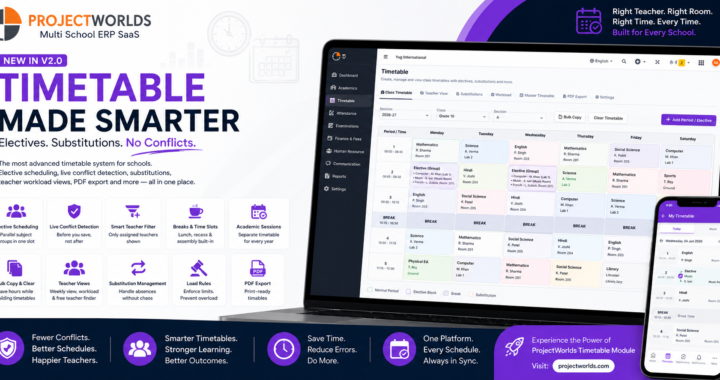
The timetable module has been completely rebuilt — from the ground up, across four major upgrades — to handle elective scheduling, live conflict detection, teacher workload views, substitution management, printable PDF timetables, and load rules. Here is everything that is now in the platform.
Elective Scheduling — Finally Solved
This was the most requested gap in the previous timetable system, and it is now fully solved.
In many schools, a single period is shared by students who have chosen different elective subjects. One group goes to Computer Science, another to Music, another to French — all at the same time, with different teachers, in different rooms. Representing this correctly in a timetable is something most school software simply cannot do.
ProjectWorlds now handles it natively.
Any period in the timetable can be marked as an elective block. When it is, instead of one subject and teacher, the cell holds one entry per elective subject in the group — each with its own teacher and room. The scheduling engine knows these run in parallel and does not flag them as conflicts.
Every parent, every student, and every teacher sees exactly their version of that period. A student enrolled in Music sees Music. A student enrolled in French sees French. A teacher assigned to Computer Science sees only their Computer Science rows. The complexity is managed in the system — not in a separate spreadsheet.
Live Conflict Detection — Know Before You Save
The old timetable builder had a significant problem: if you had made twenty changes across a week and one of them caused a conflict, everything you had entered was wiped out. You got one error message with no indication of which cell caused it, and you had to start over.
That is completely replaced.
The new builder checks for conflicts as you work, in real time. The moment you assign a teacher to a slot, the system checks whether that teacher is already scheduled somewhere else at the same time — comparing actual start and end times, not just slot IDs. If there is a clash, the cell is highlighted immediately, before you have saved anything.
When you do save, clean cells are committed successfully even if one or two cells have unresolved conflicts. You get a clear, per-cell report of exactly what clashed and why. Your work is never thrown away because of a single problem.
Room conflict detection works the same way — assign a room that is already in use during that period and you are told immediately.
The Right Teacher in Every Cell
In the old builder, every teacher in the school appeared in every subject dropdown in every cell. You could assign any teacher to any subject in any class, regardless of whether they were actually allocated to teach that subject in that class.
The new builder is smarter. When you pick a subject for a cell, the teacher dropdown shows only the teachers who have been assigned to teach that subject in that class — pulled directly from your subject-teacher assignments. If only one teacher is assigned to a subject, they are filled in automatically.
This eliminates a whole category of timetable errors — teachers appearing on timetables for subjects they do not teach, mismatches between the assignment of record and what the timetable says — without requiring any extra work from the person building the timetable.
Breaks as First-Class Periods
Lunch, recess, and assembly now exist properly in the timetable. Break periods are defined in your time slot setup and render as non-editable rows in the grid — clearly labelled, correctly positioned, impossible to accidentally assign a teaching period into.
This means your printed timetable looks the way your students and teachers expect it to look, with breaks in the right places, not as gaps or missing rows.
Academic Session Scoping — A Timetable for Every Year
Previously, the timetable had no concept of academic year. The grid was the same one forever — rolling over into a new session meant the old timetable carried forward, and there was no record of what last year's schedule looked like.
The timetable is now fully session-aware. Each academic session has its own timetable. When a new session begins, you build fresh. The previous session's timetable is preserved exactly as it was, so you always have a historical record.
This also means you can build and review next session's timetable before the current one ends — without affecting what students and teachers see right now.
Bulk Actions — Save Hours on Timetable Building
Building a timetable day by day, cell by cell, for every class is time-consuming. The new builder includes bulk actions that cut that time significantly.
Copy a day across the week — if Monday's schedule works for every day, apply it to Tuesday through Friday in one action. Adjust the exceptions manually.
Clear the entire timetable for a section — start fresh without deleting row by row.
These actions work alongside the live conflict detection, so bulk operations are also checked for clashes before they are committed.
Teacher Views — See the Load, Find the Gaps
Beyond the class timetable grid, the module now includes dedicated views for managing teacher scheduling.
The teacher weekly view shows every period any individual teacher is scheduled, across all their classes, in a single grid. It is the view a head of department uses to check that a teacher's load is balanced, not front-loaded on Mondays or split awkwardly across the week.
The workload summary shows each teacher's total periods per week at a glance — ranked, filterable, and immediately useful for spotting who is over-committed and who has capacity.
The free teacher finder lets you pick a day and a period and instantly see which teachers have no class scheduled during that slot. When a substitution is needed or a session needs to be covered, this is where you start.
Substitution Management — Handle Absences Without Chaos
Teacher absences are a daily reality in every school. The substitution feature handles them without touching the base timetable.
When a teacher is absent, you record a substitute for that teacher's periods on that date. The original timetable stays intact. The substitution sits on top of it for that day only.
Teachers see their substitution assignments on their dashboard alongside their regular schedule — clearly labelled so they know they are covering for someone else. Students and parents see the period as normal; the scheduling is handled behind the scenes.
At the end of the day, the substitution record is preserved. You have a full history of every substitution, every date, who covered for whom.
Load Rules — Prevent Scheduling Mistakes Before They Happen
The timetable builder now supports configurable load rules that prevent common scheduling mistakes.
Set a maximum number of periods per day for any teacher. Set a maximum number of periods per week for any subject. Set limits on consecutive periods for the same teacher. When you try to save a timetable that violates these rules, you are told which rule was broken and for which teacher or subject.
Rules are configurable per school. If your school has no hard limits on consecutive periods, simply leave that rule unset. Load rules are a guardrail, not a constraint — they are there when you need them and invisible when you do not.
Printable Timetables and PDF Export
Every timetable in the system — class timetables, individual teacher timetables, and the school-wide master grid — can be exported as a print-ready PDF.
Class timetable PDFs are formatted for pinning to classroom notice boards. Teacher timetable PDFs are formatted for staff rooms and personal reference. The master grid gives administration a complete view of every class and teacher across the full week.
Exports are generated from the live timetable data, so what you print is always what the system actually has — no copy-paste, no manual formatting, no version drift between the system and the printout.
Parents and Staff Always See the Right Version
Every timetable change, elective resolution, substitution, and break is reflected immediately in the parent portal and the staff mobile app.
A parent opening their child's timetable sees the correct elective subject for their child — not the group name, not a placeholder, the actual subject. If there is a substitution today, the period reflects it. If a period is a break, it shows as a break.
Staff see their personal timetable on their dashboard, updated with any substitution assignments for the current day, clearly distinguished from their regular schedule.
The timetable the system holds and the timetable parents and staff see are always the same thing.
Everything in One Place, Properly Navigated
The timetable module now has a full navigation header across every screen — the class builder, teacher view, substitutions, workload report, master grid, and PDF exports — all accessible from a single persistent tab bar.
Permission controls ensure that teachers can view timetables and manage substitutions for their own classes, while only authorised administrators can build and modify the master schedule.
This Is What School Timetable Software Should Be
Most school ERP systems have a timetable grid that stores which teacher teaches which subject in which class. That is table stakes. ProjectWorlds Multi School ERP SaaS V2.0 goes the full distance.
Here is what you get in the timetable module today:
- Elective scheduling with parallel subject groups in a single period
- Live conflict detection on teacher and room — before you save, not after
- Teacher-filtered subject dropdowns that auto-fill from your assignment of record
- Break periods that render correctly in the grid and in exports
- Academic session scoping with full timetable history
- Bulk copy and clear actions to speed up timetable building
- A teacher weekly view, workload summary, and free-teacher finder
- Substitution management that covers absences without touching the base schedule
- Configurable load rules for teachers and subjects
- Print-ready PDF exports for class, teacher, and master timetables
- Parent portal and staff app always showing the correct, current version
Explore the full platform at projectworlds.com — live demo, pricing, and the complete feature list for the Multi School ERP SaaS Script + Mobile App V2.0.