Every school in India has the same accounting problem. The school software collects fees. The CA manages Tally. And between the two sits a pile of manual work — someone exporting a report, re-entering data, reconciling figures that never quite match, and wondering why the school software says one balance and Tally says another.
ProjectWorlds Multi School ERP SaaS V2.0 just closed that gap completely.
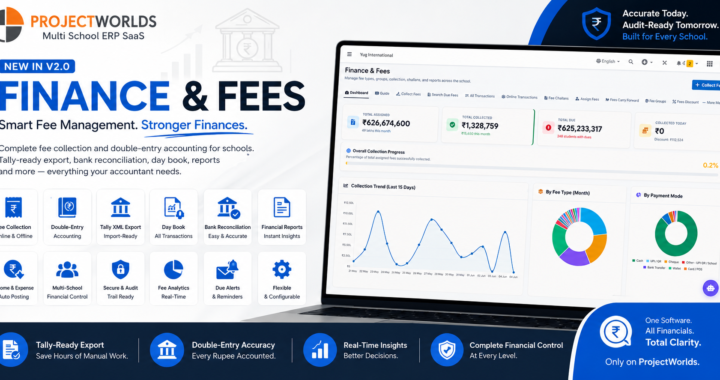
The upgraded Finance and Accounts module is the most significant accounting upgrade we have shipped. It brings proper double-entry bookkeeping underneath your existing fee screens, gives your school accountant the daily tools they actually use, and produces a Tally XML export your CA can import directly — no reformatting, no manual entry, no mismatches.
Here is everything that is now in the platform.
The Big Picture — Built to Feed Tally, Not Replace It
Indian schools will never replace Tally. The CA owns the books and Tally is where they live. We are not building a Tally competitor.
What we built is the school system that feeds Tally perfectly. Every rupee collected, every income recorded, every expense entered — all of it flows through a proper accounting engine and comes out the other end as a clean, import-ready Tally XML file your CA can load in minutes.
The school accountant gets the daily tools they need — Day Book, Bank Reconciliation, clean ledgers, a real Chart of Accounts. The CA gets correct, properly structured data. And the school principal gets executive numbers that actually match the books.
That is the design philosophy. Everything below follows from it.
A Complete Chart of Accounts — Built In and Ready to Use
The moment your school is set up, a complete Chart of Accounts is ready for you — structured the same way Tally structures its ledgers, so exports map cleanly without any manual configuration.
It covers every account a school needs: Cash and Bank accounts, Fee Income broken down by fee type, Other Income by category, Administrative Expenses by expense head, Salary and Wages, Fixed Assets, Sundry Debtors for student receivables, and liability accounts for advances and taxes.
Every fee type you have set up in your fee module automatically gets its own income ledger. Every income head and expense head maps to the right account. Your bank accounts link directly to their corresponding bank ledgers. The chart is live, accurate, and maintains itself as your school grows.
You can view and manage the Chart of Accounts directly from the Accounts module. System accounts are protected from deletion. Your own custom ledgers can be added whenever you need them.
Fee Collection That Accounts for Itself
This is the core of the upgrade, and it is completely invisible to the people collecting fees.
Every time a fee is collected — whether at the counter, through a challan, or online — the accounting entries are created automatically in the background. Tuition, transport, lab fees, library fees — each goes to its own income ledger. Fines go to a Late Fee Income account. Discounts are recorded as Discount Allowed. The bank or cash account is debited correctly.
Nobody has to do anything extra. The person collecting the fee does exactly what they always did. The accounting engine does the rest.
If a receipt is reversed, the reversal is automatically posted to the accounts as well. Nothing is deleted, nothing is overwritten — every correction leaves a clean audit trail showing what happened and when.
Wallet top-ups and overpayments are handled correctly too, treated as advances and properly relieved when they are applied to future fees.
Income and Expense — Automatically Posted
When your accountant records an income or expense in the system, the accounting entry is created at the same moment. No double entry, no separate step, no end-of-month batch process.
An income entry debits the bank or cash account and credits the right income ledger. An expense entry credits the bank or cash account and debits the right expense ledger. If an entry is edited or deleted, the original accounting post is automatically reversed and the correction is applied.
Every income and expense entry has a proper accounting record from the moment it is saved.
The Accounts Dashboard — Your Financial Position at a Glance
The Accounts module now opens on a purpose-built dashboard showing your school's financial position in real time.
You can see today's total collection, this month's income, this month's expenses, your current net cash position across all bank and cash accounts, and how many bank statement items are still waiting to be reconciled.
A twelve-month income versus expense chart shows you the trend at a glance. Your cash and bank balances are shown as live figures, not end-of-day snapshots. Recent receipts, payments, and journal entries are listed in a live activity feed.
This is the screen your accountant opens every morning. Everything they need to know about yesterday and today is right there, without opening a single report.
The Day Book — The Accountant's Most-Used Screen
The Day Book shows every financial transaction for any day or date range, in chronological order, with a running balance — exactly the way an accountant expects to see it.
Filter by date, filter by account, filter to just Cash or just a specific bank. Export to PDF or Excel for your records. Everything flows from the same accounting engine, so the Day Book always matches your ledgers and your Tally export. There is no reconciliation needed between the Day Book and the books — they are the same thing.
Bank Reconciliation — Finally Built In
Until now, bank reconciliation meant printing a report and ticking entries against your bank statement by hand. That ends with this release.
The Bank Reconciliation screen shows your book balance for each bank account alongside the entries that are still uncleared. Your accountant ticks off entries as they appear on the bank statement — or imports the statement CSV and lets the system suggest matches by amount and date.
The screen shows you three numbers at all times: your book balance, your bank statement balance, and the unreconciled difference. When the difference reaches zero, you are done. Clean, simple, and exactly the workflow accountants expect.
Unreconciled items are flagged on the Accounts Dashboard so nothing falls through the cracks between reconciliation sessions.
A Bulletproof Tally Export — The One Your CA Can Actually Use
The platform has always had a "Tally export" button. What it produced was a flat CSV that Tally could not import directly — it still required manual work on the CA's side.
That is completely replaced in this release.
The new Tally export produces proper Tally Prime XML — the import format Tally actually understands. Every voucher is correctly structured with the right ledger names, debit and credit amounts, voucher numbers, dates, and narrations. Receipt vouchers for fee collection, payment vouchers for expenses, journal vouchers for adjustments — all correctly formatted and ready to import.
The export also includes a master export — your Chart of Accounts ledgers and groups in Tally format. Your CA imports the masters once, and from then on every voucher export maps cleanly to the right ledgers by name.
Before you download, the system shows you a pre-export summary: how many vouchers, total debits and credits, and a self-check that every voucher is balanced. You never send a broken file to your CA.
The Tally Export is available from the Accounts module and from the Financial Analytics tool, with options to filter by voucher type, date range, and financial year.
Financial Analytics — Executive Numbers That Match the Books
The Financial Analytics tool in the App Center has been upgraded to read from the same accounting engine as everything else.
This means the income figures your principal sees on the executive dashboard, the revenue numbers in the Profit & Loss view, and the figures your accountant sees in the Day Book are all the same numbers, from the same source.
No more explaining why the "finance report" says one thing and the "accounts" say another. The numbers are unified because there is only one set of books.
The Analytics tool now also includes a Trial Balance view — the fundamental accounting check that debits equal credits across all accounts. It is exportable and always up to date.
Financial Year Management — Configured for India
The platform now manages a proper financial year, defaulting to April 1 through March 31 — the standard for Indian schools.
Every accounting entry belongs to a financial year. Past financial years can be locked so historical figures cannot be changed accidentally. The current financial year is always active for new entries.
Financial year boundaries are independent of your academic session, so your accounting year and your academic year can run on different calendars without any conflict.
Adjustment Journals — When the Accountant Needs Manual Control
Auto-posting handles the vast majority of accounting entries. But every accountant occasionally needs to make a manual journal — opening balances, corrections, provisions, depreciation entries.
A dedicated Adjustment Journal screen gives your accountant exactly this, with permission controls so only authorised users can post manual entries. The same balanced-entry rules apply — if debits do not equal credits, the entry will not post.
This is the only place manual journal entries can be created. Everything else — fee collection, income, expense — is automatic. This keeps the books clean while giving the accountant the escape hatch they occasionally need.
The Accounts Guide — So Your Team Is Never Lost
The Accounts module includes a built-in Guide page that explains how school accounting works in this platform — what posts automatically, what the accountant manages manually, how to run a reconciliation, and how to hand the Tally XML to your CA.
It is written for school accountants, not for developers. Clear, plain language, step by step. This is the page you show a new accountant on their first day.
Everything Under One Roof, With Proper Navigation
The Accounts module now has a full navigation header across every screen — Dashboard, Income, Expense, Day Book, Bank Reconciliation, Chart of Accounts, Tally Export, Bank Accounts, Settings, and Guide — all in a single persistent tab bar, permission-gated so each role sees only what they need.
School admins and accountants get the full view. Staff who only record income and expenses see a simplified view. The principal and management see the Financial Analytics dashboard. Everyone works from the same underlying books.
What Is Coming Next
The foundation is in place for further accounting automation. On the roadmap:
- Payroll accounting — salary payments, PF, ESI, TDS, and loan recoveries posting to the books automatically when payroll is processed
- Inventory accounting — purchases, stock, supplier payments, and sales linked to the accounting engine
- Full financial statements — Balance Sheet, statutory Cash Flow, GST and TDS ledgers, financial year close, and consolidated reporting for multi-branch school networks
These will be additive — built on top of the engine that is live today, with no rewrites needed.
This Is What School Finance Software Should Be
Most school ERP systems treat accounts as a reporting afterthought. ProjectWorlds Multi School ERP SaaS V2.0 treats accounting as the foundation — because the school accountant's daily life and the CA's monthly work should both be easy, accurate, and never require manual reconciliation between two systems.
Here is what you get in the Finance and Accounts module today:
- A complete Chart of Accounts, structured for Tally compatibility, ready from day one
- Automatic accounting entries on every fee collection, income, and expense
- Automatic reversal when receipts are cancelled or entries are deleted
- A real-time Accounts Dashboard with collection, income, expense, and cash position
- A Day Book showing every transaction for any date range, with running balance
- Bank Reconciliation with statement import and matched-entry clearing
- A bulletproof Tally Prime XML export — vouchers and masters, import-ready
- A Trial Balance that always balances
- Financial year management configured for India's April–March cycle
- An Adjustment Journal for manual entries with full permission control
- Financial Analytics numbers that match the books, always
- An in-app Guide written for school accountants
Explore the full platform at projectworlds.com — live demo, pricing, and the complete feature list for the Multi School ERP SaaS Script + Mobile App V2.0.