Trading Journal & Trade Analyzer System ek advanced, fully-dynamic web application hai jo traders ko apne daily trades track karne, analyze karne aur trading mistakes identify karne me help karta hai.
Yeh specially Options Traders (NIFTY, BankNIFTY, SENSEX) ke liye design kiya gaya ek real-world project hai.
Is system me user har trade ka:
- Entry / Exit
- Direction (BUY/SELL)
- Instrument (CALL/PUT)
- Auto Lot Size
- Auto PnL Calculation
- Mistakes Tracking
- Setup Tracking
sab maintain kar sakta hai, aur dashboard par Daily, Weekly, Monthly complete performance dekh sakta hai.
🔥 Key Features
✔ 1. Add Trade with Auto P&L Calculation
- Buy/Sell ke hisab se PnL auto calculate
- CALL/PUT detection
- Auto lot size (75 / 35 / 20)
- Live PnL calculator
- Mistake tracking (FOMO, Overtrade, No setup, Loss holding)
- Setup selection
- Notes section
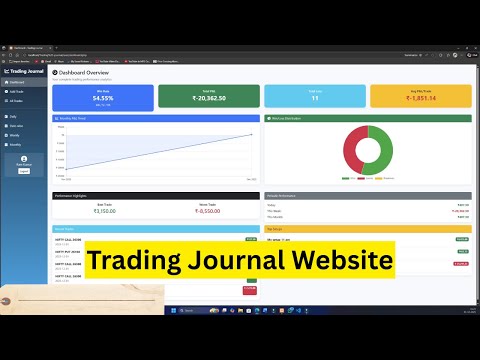
✔ 2. Smart Dashboard Analytics
- Total Trades
- Total P&L
- Win/Loss ratio
- Today’s P&L
- Weekly P&L
- Monthly Analysis
- Best & Worst Trades
- Recent trades list
- Top performing setups
✔ 3. Analysis Module
- Daily Analysis
- Date-wise Analysis
- Weekly Analysis (Mon–Fri)
- Monthly Report
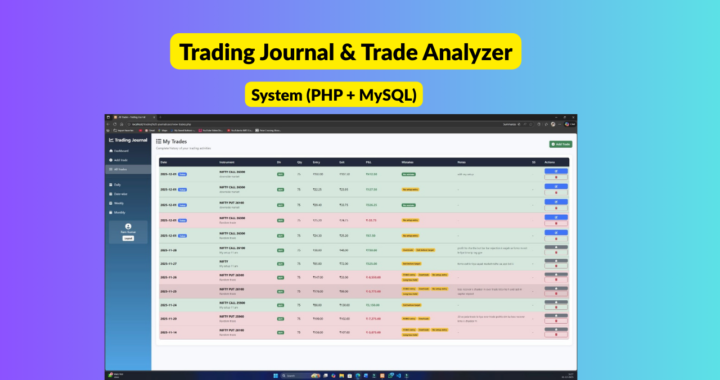
✔ 4. Complete Tradebook
- All Trades list
- Sort / Search / Filter
- Edit (same day only)
- Delete old trades
- Mistakes highlighted with badges
✔ 5. Clean & Modern UI
- Sidebar navigation
- Mobile responsive
- Dashboard cards
- Icons with FontAwesome
- Smooth styling with Bootstrap 5
✔ Technology Used
| Technology | Role |
| PHP (Core) | Backend |
| MySQL | Database |
| JavaScript | Auto PnL logic |
| Bootstrap 5 | UI / Responsive design |
| HTML/CSS | Frontend |
| FontAwesome | Icons |
🧑🎓 Who Can Use This Project?
- BCA Final Year Project
- MCA / B.Tech / BSc IT Projects
- Diploma CS Students
- Real Traders
- Anyone learning PHP/MySQL
Yeh ek real-world practical system hai jo trading skill improve karne me help karta hai.
⚙️ Installation Process (Step-by-Step)
🔧 1. Install XAMPP
- Download XAMPP
- Start → Apache & MySQL
📁 2. Copy Project Folder
Project ko paste karein:
C:\xampp\htdocs\Trading-Journal\
🗄 3. Import Database
- Open http://localhost/phpmyadmin
- Create DB: tradingjournal
- Import file: database.sql
⚙️ 4. Configure Database
Open:
config/db.php
Update:
$host = "localhost";
$user = "root";
$pass = "";
$db = "tradingjournal";
🌐 5. Run Project
Browser me enter karein:
http://localhost/Trading-Journal/
👤 6. Create User
Login page → Register → Start Using Dashboard
➕ 7. Add Trade
- Instrument select
- Direction choose
- Entry/Exit enter
- Auto PnL show hoga
- Save trade
📊 8. View Reports
Dashboard → Daily → Weekly → Monthly
💸 Pricing
⭐ Complete Source Code
Price: ₹1201
Included:
- ✔ Full PHP Source Code
- ✔ MySQL Database
- ✔ Auto PNL System
- ✔ Dashboard + All Analytics
- ✔ Complete Project Folder
- ✔ Installation Guide
- ✔ Lifetime Support
❌ Project Report NOT Included
Project report separate charge me milega.
📝 Optional: Project Report
(Editable Word File + PDF)
Agar chahiye to report bhi bana dunga.
🎯 Final Note
Yeh project 100% working, exam-ready, presentation-ready, aur real trading logic based hai.
Students & traders dono ke liye best value.